Back to Shop
AeroCast Overlay — Picture-in-Picture Screen Mirror & Floating Ghost Utility for Windows
৳3,490
৳2,990
(≈ $24.92 USD)
Live Conversion Rate: 1 USD ≈ ৳120.00 BDT
✅ Windows 10 & 11 (64-bit)
⚡ Unlimited Multi-Overlays
👻 Click-Through Ghost Mode
🛡️ <1.5% CPU Overhead
✨ Universal 3-in-1 Selection Hub
Launch any screen mirror in under 2 seconds using the integrated 3-way modal:
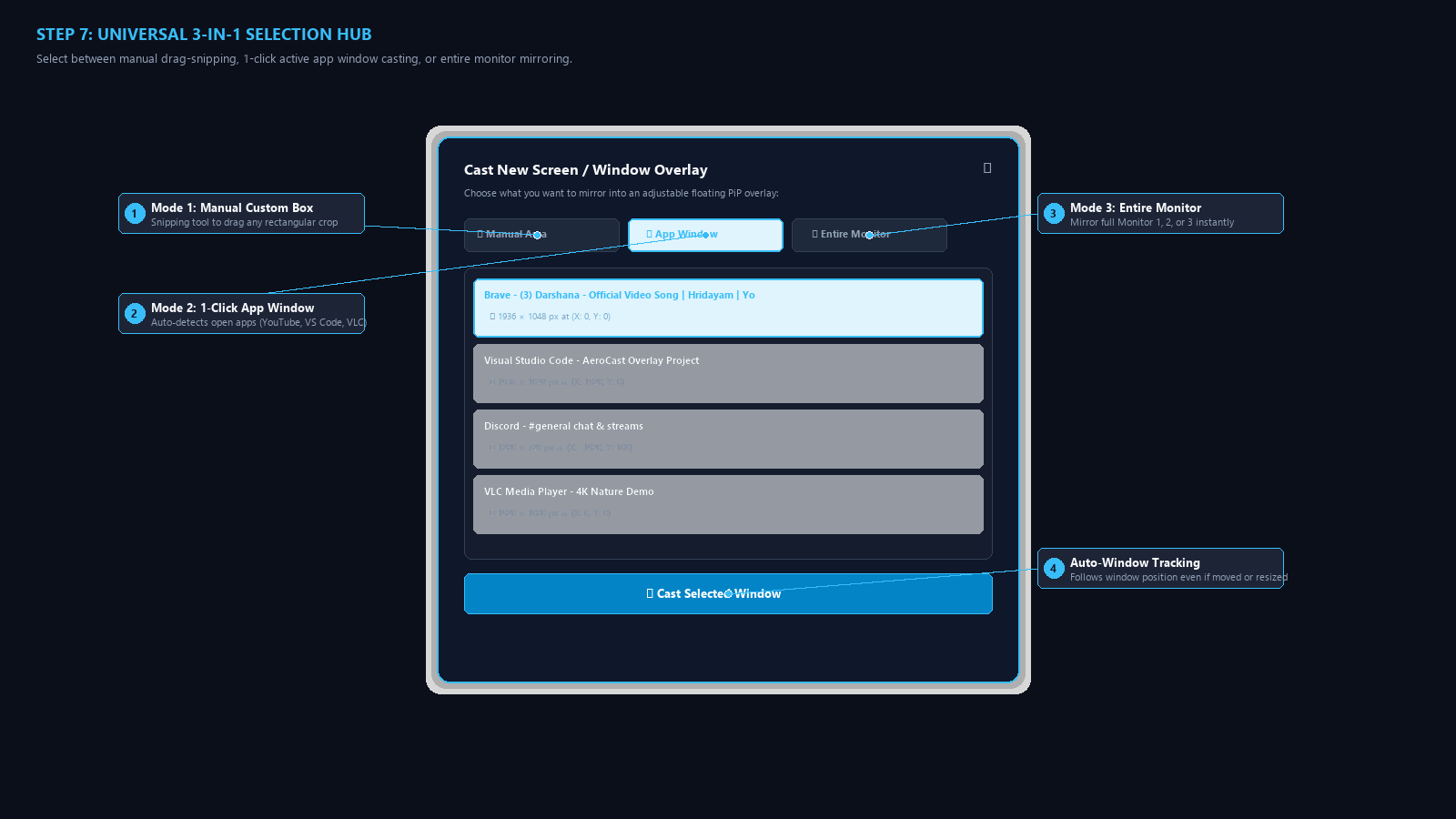
- ✂ Manual Custom Snipping: Click and drag a precision bounding box over any video player, chart, document, or monitor region.
- 🪟 App Window Tracking: 1-click select and mirror any active application (YouTube, VS Code, Discord, VLC). Automatically tracks the window if you move or resize it!
- 🖥 Entire Monitor Mirroring: Mirror an entire display (Display 1, 2, or 3) into a movable desktop floating widget.
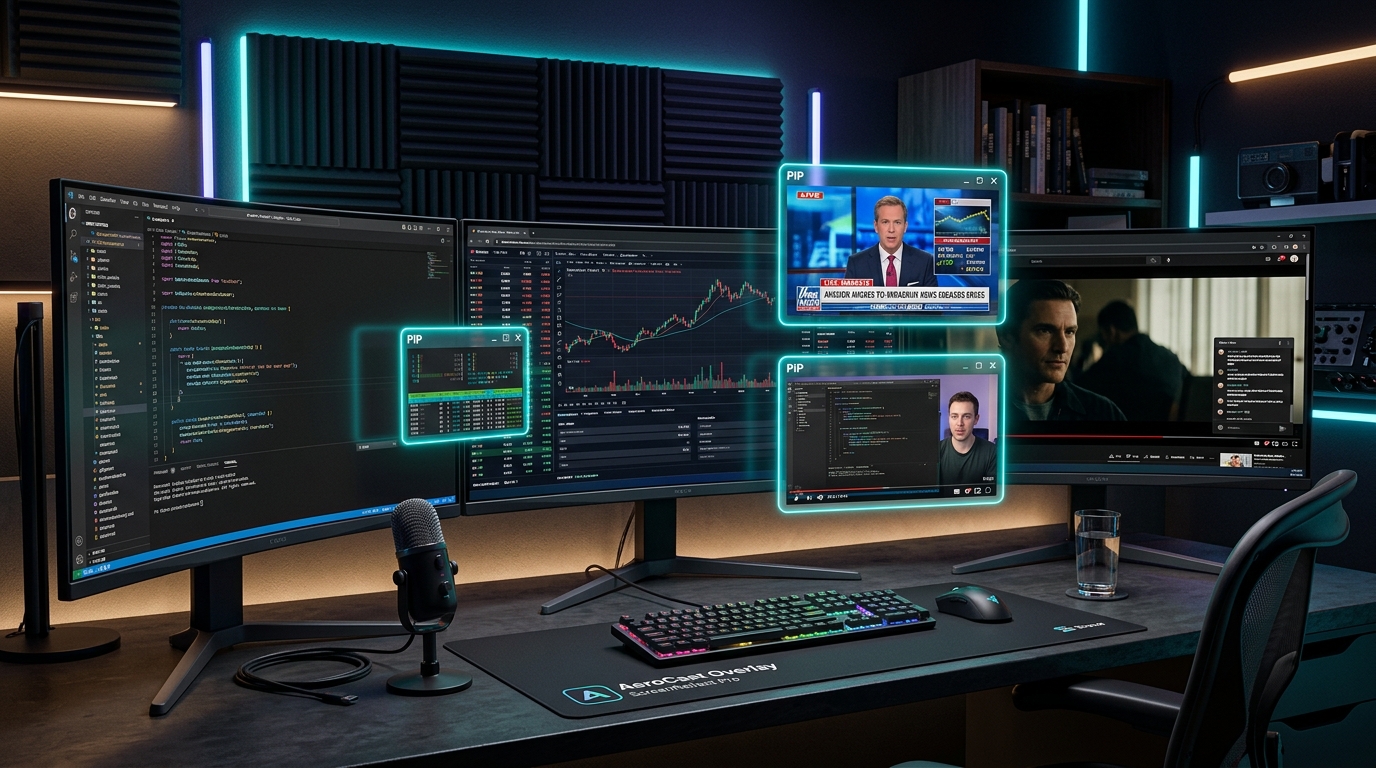
⚡ Multi-Overlay Architecture (Simultaneous Casting)
Run multiple independent floating windows at the same time:
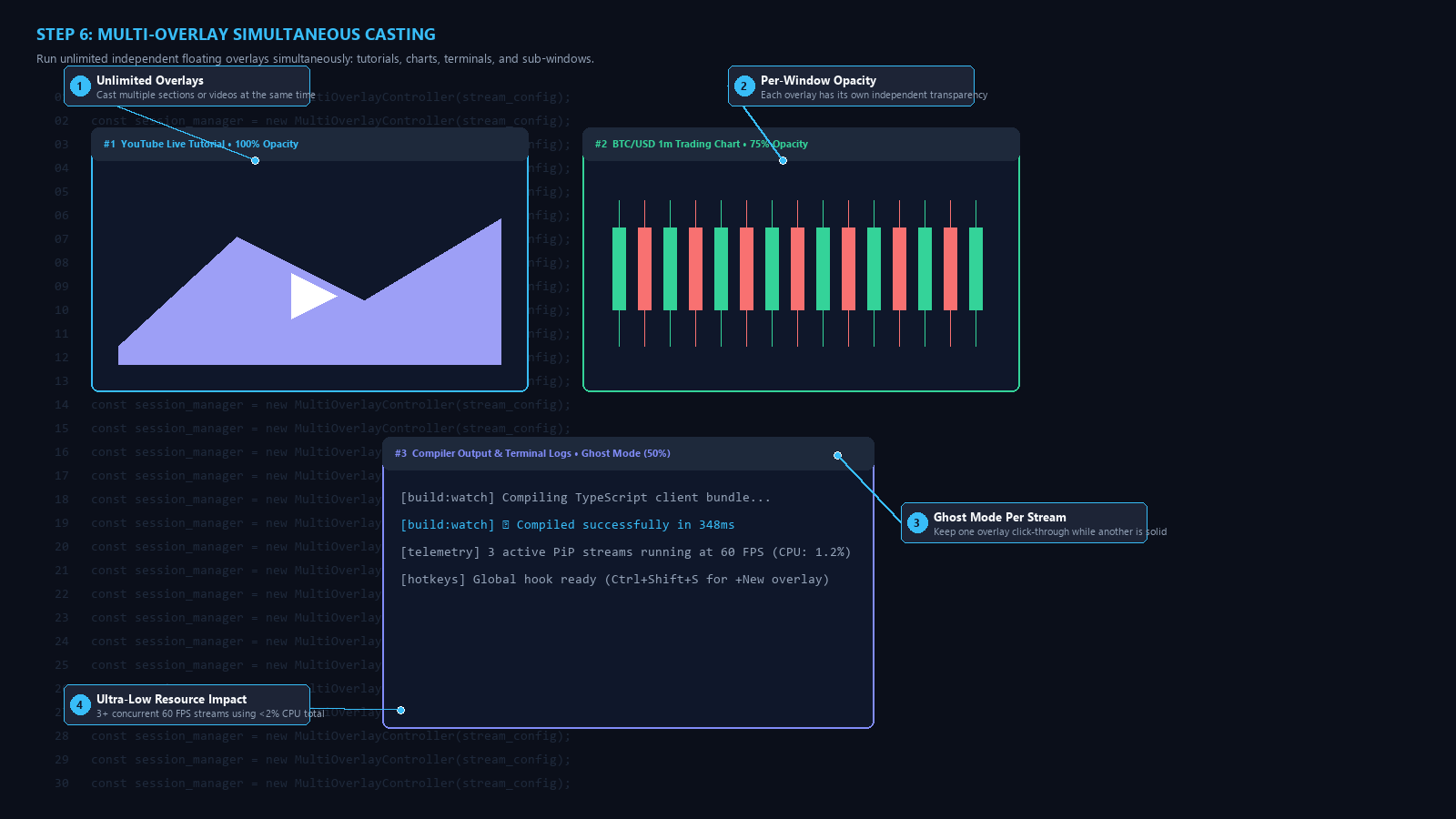
- Independent Pipelines: Each overlay has its own background capture thread at up to 60 FPS.
- Independent Window Controls: Keep Overlay #1 at 100% opacity for reference, and Overlay #2 at 40% Ghost Mode over your code editor.
- Overlay ID Badges: Control bars display
#1,#2,#3for easy organization.
👻 Click-Through Ghost Mode (Ctrl + Shift + G)
Ghost Mode removes all mouse interaction obstacles so you can work directly beneath your floating videos:
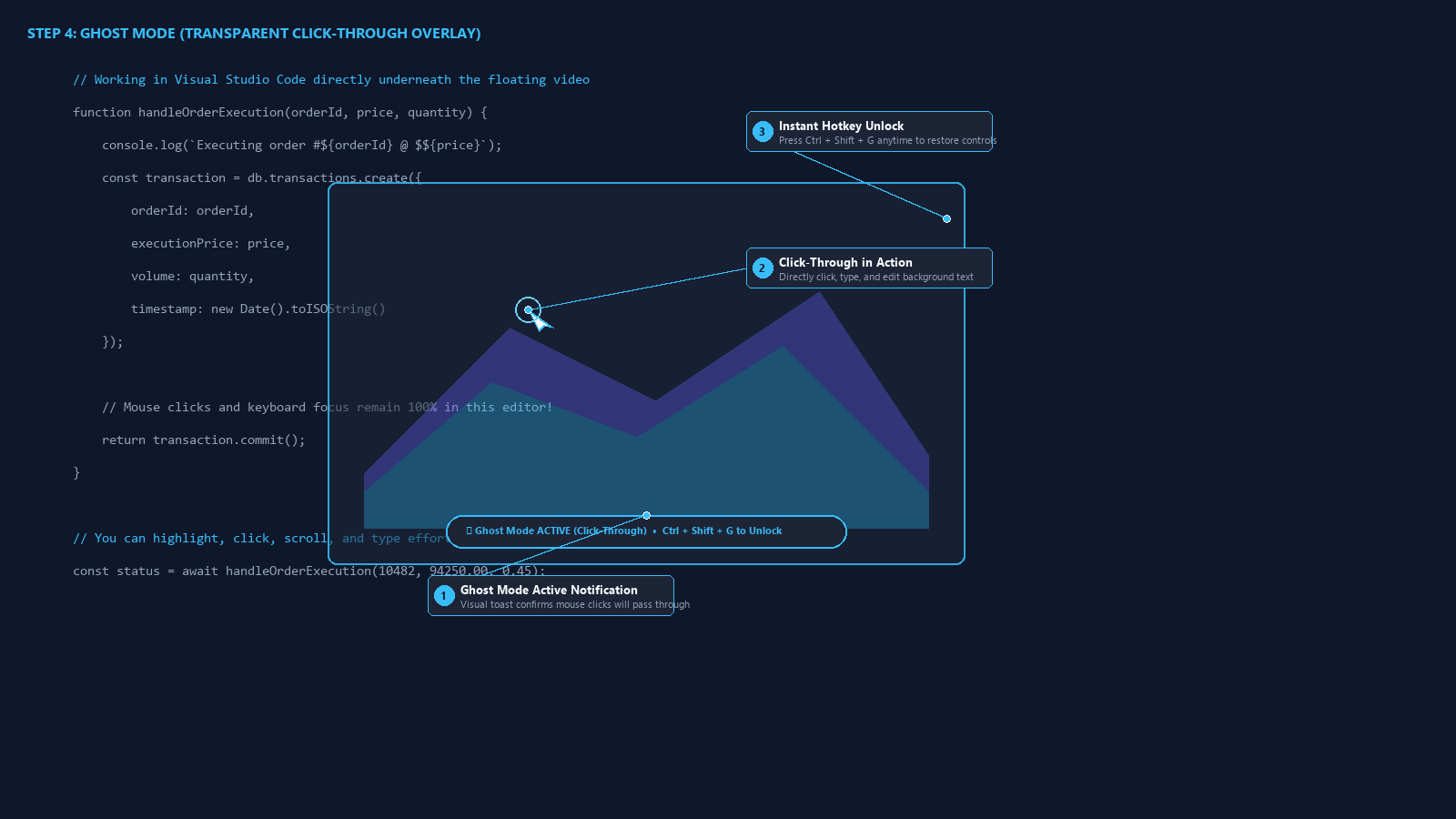
- Type & Click Right Through: Mouse clicks and scroll events pass directly into applications beneath the overlay (VS Code, Chrome, Word).
- 1-Key Unlock: Press
Ctrl + Shift + Ganywhere on your keyboard to toggle Ghost Mode back off when you want to resize or relocate.
🎛️ Glassmorphic Auto-Hiding Control Bar
When your mouse leaves, the window turns into 100% frameless content. Hovering reveals full streaming telemetry:
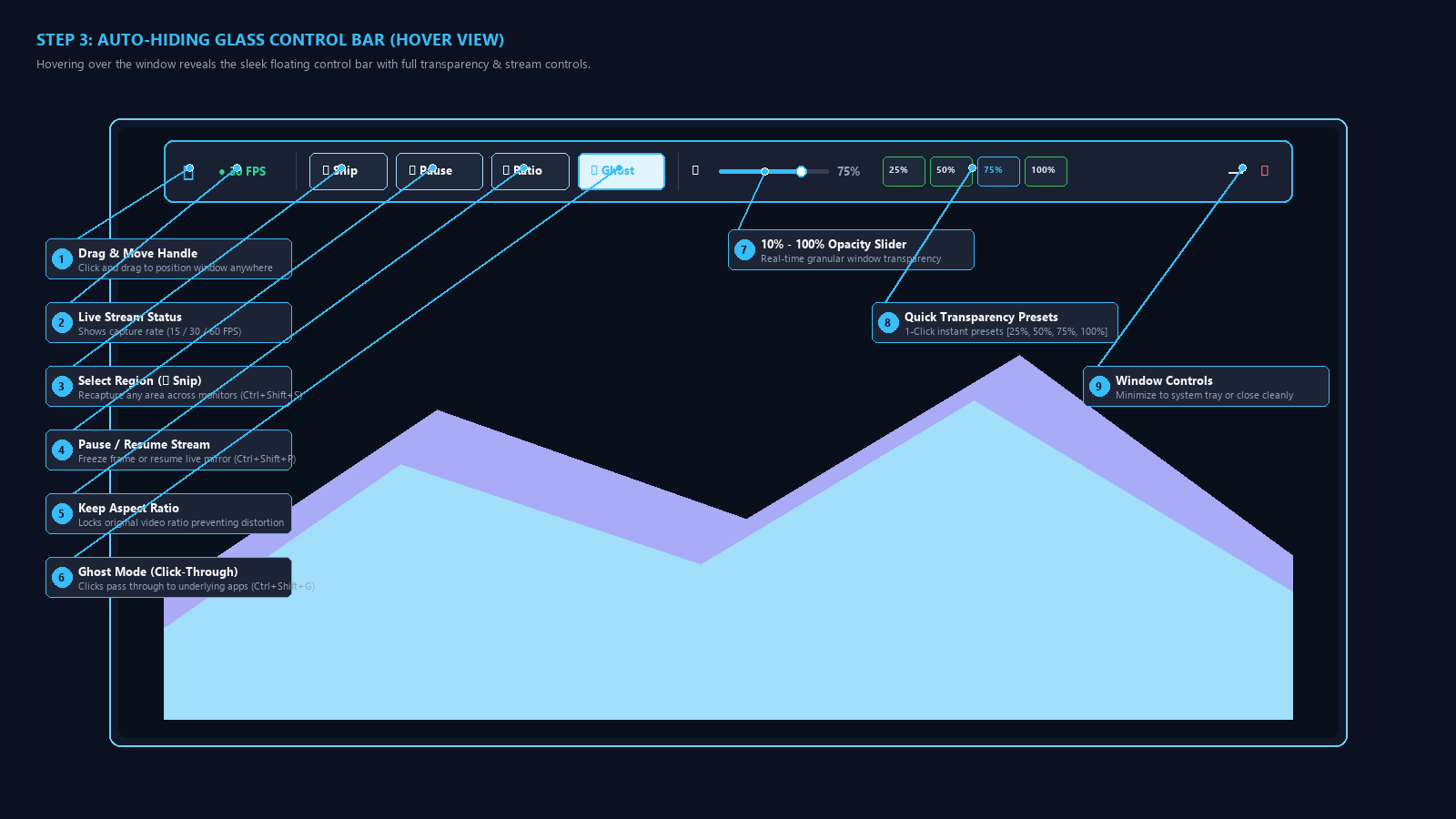
- Stream Health Telemetry: Live FPS and latency status (
● 30 FPS / LIVE). - Aspect Ratio Lock: Prevents video stretching and image distortion.
- Live Opacity Matrix: Slider from 10% to 100% plus 1-click presets (
25%,50%,75%,100%). - Pause / Resume: Freeze frame at any time (
Ctrl + Shift + P).
⌨️ Master Keyboard Shortcuts
| Global Shortcut | Action Triggered |
|---|---|
Ctrl + Shift + S |
➕ Open Selection Hub / Cast New Window or Region |
Ctrl + Shift + G |
👻 Toggle Click-Through Ghost Mode ON / OFF |
Ctrl + Shift + P |
⏸ Pause / Resume Live Screen Mirror Streams |
Ctrl + Shift + H |
👁 Toggle Visibility for all floating overlays |
Alt + Left Drag |
✥ Reposition floating window across any monitor |
Esc |
❌ Cancel region snipping mode safely |
💼 Commercial Use Cases
📈 Crypto & Day Traders
Pin live candlestick charts and order books directly over trading platforms with zero multi-monitor clutter.
💻 Software Developers
Float video documentation or coding tutorials in 50% opacity Ghost Mode directly inside VS Code.
🎮 Streamers & Gamers
Mirror OBS preview cards, Twitch live chat, or Discord voice stats directly over games without tab switching.
📚 Researchers & Students
Watch online lectures and take notes simultaneously in split-screen or transparent overlay formats.
📦 What You Get in This Digital Download
- aerocast-overlay-pro-v1.2-windows-streamer-pip-tool.zip (37.35 MB): Standalone Windows executable
AeroCast_Overlay.exe(zero Python or runtime installation needed). - Official User Manual (HTML & Markdown): Interactive offline guide with high-resolution visual callouts.
- README_FOR_BUYERS.txt: Quick reference guide for keyboard shortcuts and multi-monitor setup.
- Commercial Lifetime License: Use on unlimited personal and commercial Windows workstations.
💳 Instant Delivery: Download link is provided immediately upon order completion and also dispatched to your verified email address.